

LLM Parser
The LLM parser calls a large language model to parse RSS titles when regex parsing fails or when higher-quality parsing is desired.
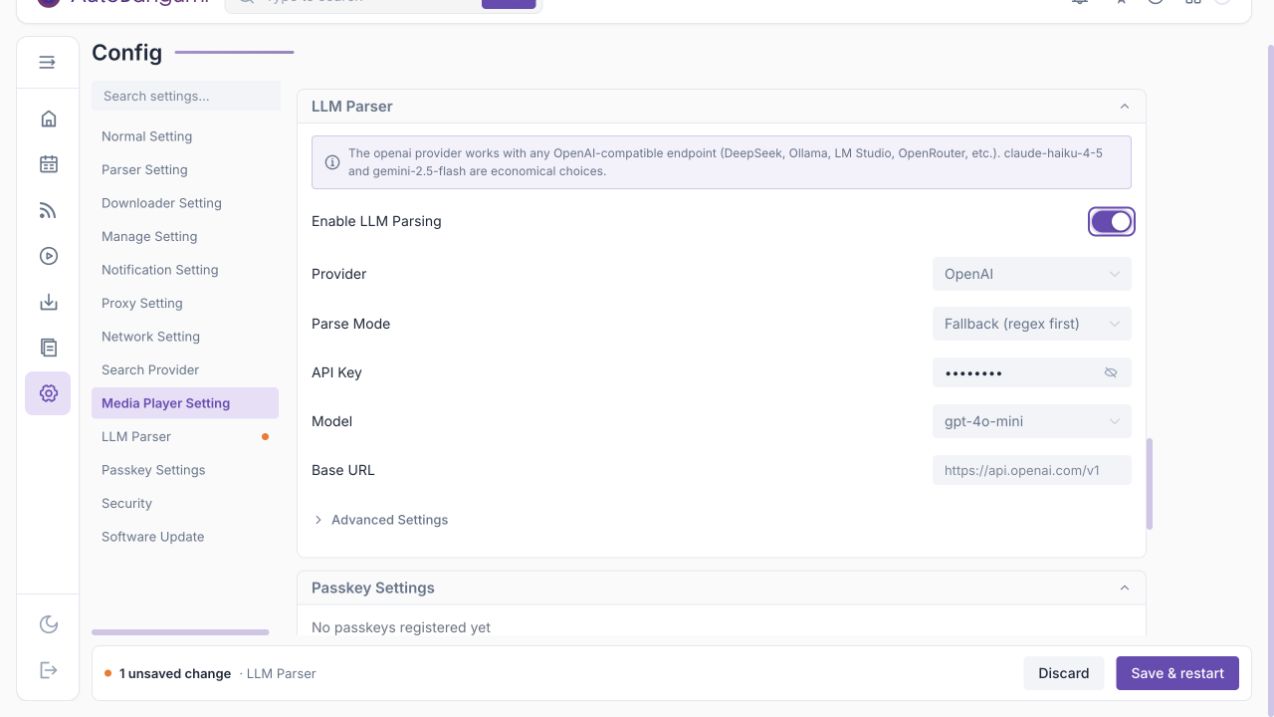
Parse Mode
- Fallback (regex first): default. Use regex first, then LLM if regex fails.
- Primary (LLM first): use LLM first, then regex as a safety net.
Providers
Built-in providers include:
- OpenAI, including OpenAI-compatible endpoints such as DeepSeek, Ollama, LM Studio, OpenRouter and OneAPI.
- Anthropic
- Google Gemini
The settings page can also show installed presets, subscription-account providers and downloadable providers. Subscription providers need to be connected first; downloadable providers may show a risk notice before installation.
LLM requests use the app proxy settings.
config.json
Section: llm
| Key | Description | Type | WebUI field | Default |
|---|---|---|---|---|
enable | Enable LLM parsing | boolean | Enable LLM Parsing | false |
provider | Provider ID | string | Provider | openai |
api_key | API key for built-in OpenAI provider | string | API Key | "" |
model | Model name | string | Model | gpt-5-mini |
base_url | OpenAI-compatible endpoint | string | Base URL | "" |
mode | fallback or primary | string | Parse Mode | fallback |
timeout | Request timeout | number seconds | Advanced Settings | 20 |
cache_ttl | Parse cache TTL | integer seconds | Advanced Settings | 900 |
max_concurrency | Maximum concurrent requests | integer | Advanced Settings | 2 |
failure_threshold | Failures before circuit breaker | integer | Advanced Settings | 3 |
failure_backoff | Circuit breaker pause | integer seconds | Advanced Settings | 300 |
providers | Per-provider overrides | object | saved by provider | {} |