

Bangumi Manager
WebUI
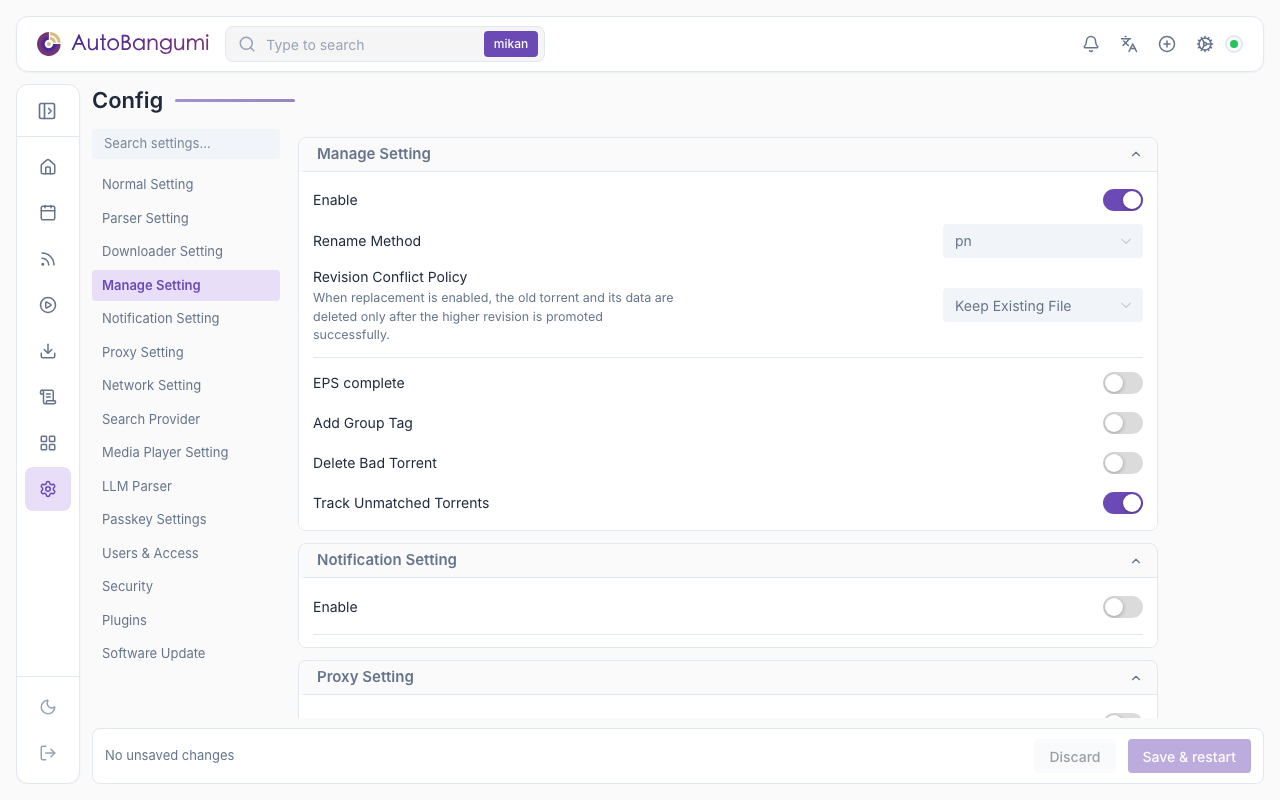
- Enable: enables file organization and rename behavior.
- Rename Method:
pn: keeps more release-title information, using aTorrent title S0XE0Xstyle.advance: uses official title and standard season/episode naming.none: do not rename files.template: name files with your own template, see Template rename.pn,advanceandtemplatecome from the built-inrenameplugin, which is enabled by default. If you disable it under Settings → Plugins, every series is handled asnone. Other plugins can add rename methods; enabled ones appear in the drop-down.
- EPS complete: tries to backfill missing episodes in the current season.
- Add Group Tag: adds subgroup-related tags to downloader tasks.
- Delete Bad Torrent: removes errored downloader tasks.
- Revision Conflict Policy: when a torrent with a higher revision targets an existing episode, select Keep Existing File or Replace with Higher Revision. With replacement, the old torrent and its data are deleted only after the higher revision is in place.
- Track Unmatched Torrents: stores torrents that do not match any rule as orphan records. Disable it if you want newly added rules to catch old feed items immediately, at the cost of rechecking those old items on each RSS refresh.
Template rename
With template, file names come from the template of the built-in rename plugin. Edit the file name template under Settings → Plugins → rename. The default is:
{{ title }} S{{ season|pad(2) }}E{{ episode|pad(2) }}For normal episodes the default produces the same names as pn. For movies, pn adds no SxxExx, but the default template does. Templates use sandboxed Jinja2 syntax with these variables:
| Variable | Meaning | Example |
|---|---|---|
title | title parsed from the file name | Frieren |
bangumi_name | series folder name | Frieren (2023) |
season | season, from the Season folder (season offset applied) | 1 |
episode | episode (episode offset applied; half episodes keep the fraction) | 5, 12.5 |
episode_type | episode / movie / special | episode |
group | release group, may be empty | ANi |
kind | media or subtitle | media |
language | subtitle language, empty for media | zh |
The pad(n) filter zero-pads the integer part to n digits and keeps the fraction: {{ episode|pad(3) }} gives 005, {{ 12.5|pad(2) }} gives 12.5.
- The template renders only the base name. The extension is appended for you (
.zh.assstyle for subtitles). - On save, the template is rendered once against a sample file. Templates with syntax errors, unknown variables or an invalid result are rejected.
- If a file fails to render at run time, or the result is empty or contains
/or\, that file keeps its name and you get a "Files kept their names" notification. The torrent is not taggedab:renamed, so the next cycle retries after you fix the template. It never falls back topn.
Example: [{{ group }}] {{ bangumi_name }} - {{ episode|pad(2) }} → [ANi] Frieren (2023) - 05.mkv
WARNING
A new rename method or template applies only to torrents organized afterwards. Torrents already organized (tagged ab:renamed) are not renamed again.
Hard links to a media library
The built-in hardlink plugin is disabled by default. Enable it under Settings → Plugins. After a torrent is organized, it links the video and subtitle files into a library folder. The download folder stays as it is and keeps seeding.
| Option | Description | Default |
|---|---|---|
source_root | download root as AutoBangumi sees it (absolute path). The library mirrors its folder structure | none, required |
library_root | library folder (absolute path), must not be inside source_root | none, required |
path_map | list of {downloader, from, to}: replaces the path prefix from, as downloader instance downloader (default default) sees it, with the path to that AutoBangumi sees. Longest prefix wins; unmatched paths are used as they are | [] |
cross_device | what to do when a hard link would cross file systems: copy the file, create a symlink, or skip and notify | copy |
- If the library already has a file with that name that the plugin did not create, the plugin skips it, never overwrites it, and sends a notification.
- After a revision upgrade (a new release replaces the old torrent under the same file name), the link the plugin made earlier is atomically replaced with a link to the new file.
- Deleting a torrent does not delete its links in the library.
- If you delete a file that the plugin placed in the library, the plugin does not link it again. A backfill links it again.
- Files downloaded before you enabled the plugin are not linked automatically. When the plugin is enabled, the settings page shows a "Hardlink backfill" section. Click Link existing files to link the videos and subtitles already in the download root into the library. Files that are already linked are skipped. The button calls
POST /api/v1/plugins/hardlink/backfill. - Edit
path_mapin the plugin options form, one row per entry (Add row). Inconfig/config.jsonit isplugins.options.hardlink.path_map, for example[{"downloader": "default", "from": "/downloads", "to": "/media/downloads"}].
Docker
Hard links cannot cross file systems. In Docker, keep the download folder and the library on the same disk and mount them into the AutoBangumi container through one mount (for example, mount /mnt/media as /media with both folders below it). Two separate mounts count as different file systems even on the same disk; the plugin then follows cross_device (by default it copies, which uses twice the space). If the downloader runs in another container and sees different paths, use path_map.
Media server refresh
The built-in media-server-refresh plugin asks Jellyfin, Emby or Plex to refresh the library after a torrent is organized. Under Settings → Plugins → media-server-refresh, select the server type and enter the server URL and API key (for Plex, the X-Plex-Token). Without them the plugin does nothing. After an event it waits delay seconds (default 30) and sends one refresh for all torrents organized in that time. Events that arrive after the refresh request is sent cause one more refresh. When the hardlink plugin is enabled, the plugin refreshes again after the files are in the library, so a copy across disks that takes longer than the delay does not hide the new episode.
config.json
Section: bangumi_manage
| Key | Description | Type | WebUI field | Default |
|---|---|---|---|---|
enable | Enable manager | boolean | Enable | true |
eps_complete | Enable episode completion | boolean | EPS complete | false |
group_tag | Add subgroup tags | boolean | Add Group Tag | false |
remove_bad_torrent | Delete errored torrents | boolean | Delete Bad Torrent | false |
track_orphans | Track unmatched torrents | boolean | Track Unmatched Torrents | true |
The rename method and the revision conflict policy are provider choices. They are stored in plugins.slots: rename_strategy (rename method, default pn) and conflict_policy (hold / replace, default hold). On the first start after an upgrade to 4.0, the 3.3 keys bangumi_manage.rename_method and revision_conflict_policy move there automatically. For details, see Plugin Settings.