

Contributing Guide
We welcome contributors to help make AutoBangumi better at solving issues encountered by users.
This guide will walk you through how to contribute code to AutoBangumi. Please take a few minutes to read through before submitting a Pull Request.
This article covers:
Project Roadmap
The AutoBangumi development team uses GitHub Project boards to manage planned development, ongoing fixes, and their progress.
This helps you understand:
- What the development team is working on
- What aligns with your intended contribution, so you can participate directly
- What's already in progress, to avoid duplicate work
In Project, beyond the usual [Feature Request], [BUG], and small improvements, you'll find [RFC] items.
Request for Comments (RFC)
Find existing AutoBangumi RFCs via the
RFClabel in issues.
For small improvements or bug fixes, feel free to adjust the code and submit a Pull Request. Just read the Branch Management section to base your work on the correct branch, and the Pull Request section to understand how PRs are merged.
For larger feature refactors with broad scope, please first write an RFC proposal via Issue: Feature Proposal to briefly describe your approach and seek developer discussion and consensus.
Some proposals may conflict with decisions the development team has already made, and this step helps avoid wasted effort.
If you only want to discuss whether to add or improve a feature (not "how to implement it"), use -> Issue: Feature Request
An RFC Proposal is "a document for developers to review technical design/approach before concrete development of a feature/refactor".
The purpose is to ensure collaborating developers clearly know "what to do" and "how it will be done", with all developers able to participate in open discussion.
This helps evaluate impacts (overlooked considerations, backward compatibility, conflicts with existing features).
Therefore, proposals focus on describing the approach, design, and steps for solving the problem.
Git Branch Management
Version Numbering
Git branches in the AutoBangumi project are closely related to release version rules.
AutoBangumi follows Semantic Versioning (SemVer) with a <Major>.<Minor>.<Patch> format:
- Major: Major version update, likely with incompatible configuration/API changes
- Minor: Backward-compatible new functionality
- Patch: Backward-compatible bug fixes / minor improvements
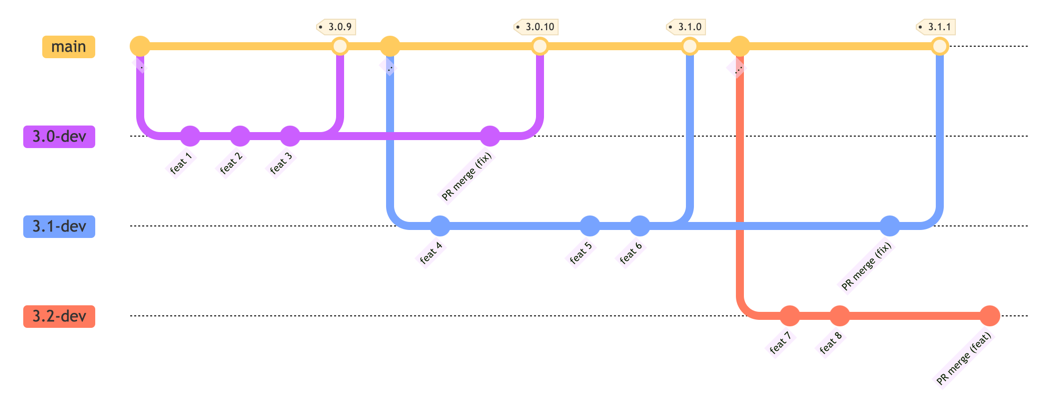
Branch Development, Trunk Release
AutoBangumi uses a "branch development, trunk release" model.
main is the stable trunk branch, used only for releases, not for direct development.
Each Minor version has a corresponding development branch for new features and post-release maintenance.
Development branches are named <Major>.<Minor>-dev, e.g., 3.1-dev, 3.0-dev, 2.6-dev. Find them in All Branches.
Branch Lifecycle
When a Minor development branch (e.g., 3.1-dev) completes feature development and first merges into main:
- Release the Minor version (e.g.,
3.1.0) - Create the next Minor development branch (
3.2-dev) for next version features- The previous version's branch (
3.0-dev) is archived
- The previous version's branch (
- This Minor branch (
3.1-dev) enters maintenance — no new features/refactors, only bug fixes- Bug fixes are merged to the maintenance branch, then to main for
Patchreleases
- Bug fixes are merged to the maintenance branch, then to main for
For contributors choosing Git branches:
- Bug fixes — base on the current released version's Minor branch, PR to that branch
- New features/refactors — base on the next unreleased version's Minor branch, PR to that branch
"Current released version" is the latest version on the [Releases page]
Git Workflow Overview
Commit timeline goes from left to right --->
Pull Request
Ensure you've selected the correct PR target branch per the Git Branch Management section above:
- Bug fixes → PR to the current released version's Minor maintenance branch
- New features/refactors → PR to the next version's Minor development branch
A PR should correspond to a single concern and not introduce unrelated changes.
Split different concerns into multiple PRs to help the team focus on one issue per review.
In the PR title and description, briefly explain the changes including reasons and intent.
Link related issues or RFCs in the PR description.
This helps the team understand context quickly during code review.
Ensure "Allow edits from maintainers" is checked. This allows direct minor edits/refactors and saves time.
Ensure local tests and linting pass. These are also checked in PR CI.
- For bug fixes and new features, the team may request corresponding unit test coverage.
The development team will review contributor PRs and discuss or approve merging as soon as possible.
Release Process
Releases are currently triggered automatically after the development team manually merges a specific "release PR".
Bug fix PRs are typically released quickly, usually within a week.
New feature releases take longer and are less predictable. Check the GitHub Project board for development progress — a version is released when all planned features are complete.